An LLM-Augmented Work Wiki
I like to maintain my own personal set of Markdown notes for work. The act of typing ideas and information helps me process them mentally. I tend to organise my notes as a series of daily notes with links to longer-lived reference notes for concepts or projects.
I switched from NotePlan to Obsidian as a veneer over the Markdown files a while back. I didn’t have a need for NotePlan’s task management infrastructure. Obsidian is free and has loads of plugins if you want to cut loose on extending it.
I recently started a new job, which meant creating a brand-new vault, and I felt like giving the LLM Wiki approach a crack. Ultimately, having a robot do all the wiki bookkeeping for me feels like a worthwhile experiment.
The overall workflow is simple: I write in my daily note throughout the day, and I ask an LLM to process it at the end of the day. The LLM fetches relevant meeting transcripts and whatever else it can find by following links in my daily note. It then links everything together in long-lived notes covering projects, domain concepts, people I work with, and anything else it decides to maintain.
I also maintain a file called big-picture.md, which outlines the main open loops on my mind from week to week. The LLM doesn’t edit the main part of this file, though it can add reference information to a dedicated section at the bottom.
The vault is a Git repository, so both the LLM and I can use its version history to see how things have evolved over time.
I can search the long-lived notes in Obsidian to get an up-to-date view of each project, person, or concept, along with related information from linked notes.
As a bonus, during my end-of-week review, I ask the LLM to summarise my week, including which tasks or open loops I’ve moved forward or closed, and which new ones I’ve created. This helps me set my goals for the following week. I put these reflections and goals in a weekly note.
That’s pretty much it. I’ve found the reduction in bookkeeping valuable so far. I’ll see how well it scales over time.
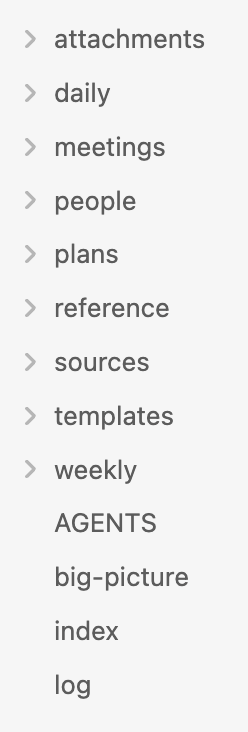
The layout of my work wiki
As for plugins, I try to use as few as possible. These are the ones I use in this vault.
- At People for easily creating references to people notes.
- Seek for better vault search than Obsidian provides out of the box.
- Calendar for visually navigating daily and weekly notes.
- Dataview for rolling up indexes of notes. The LLM added this and uses it; I only consume the results.
- Mister Sheen for sanitising text pasted in from Slack and Google Docs. I got the LLM to write this private plugin to apply my preferred formatting.