Productivity

Content tagged "Productivity".

Mark Forster's Final Version

Mark Forster:

The most distinctive feature of FV is the way that its algorithm is primarily based on psychological readiness—this then opens the way to keeping urgency and importance in the best achievable balance.

I’m a sucker for productivity systems. I like the simplicity of this one.

Prime the Pump

Each Friday afternoon, I write a summary of my work week that includes my achievements, the impediments I encountered, and my goals for the next week1.

This last step proves to be quite valuable the following Monday morning.

I start my week with my weekly review. One of the first things I do is review the goals I set the previous Friday. This way, I can shake off the Monday morning rust and immediately aim for something. It eases my way into a work headspace and my work week.

This process reminds me of the advice to end your writing sessions mid-sentence so you can carry that momentum forward when you next sit down to write.


  1. We use 15Five for this but a simple document would do the trick. ↩︎

Manage Your Capacity, Not Your Time

James Stanier:

regardless of how much autonomy and self-directed time you accumulate, optimal allocation of your capacity is not a box packing problem where you must allocate every single minute of your day. This is an anti-pattern.

If we’ve been lucky enough to work with leaders that manage their capacity well, then we may have been surprised that when we reach out with something urgent, they are able to respond quickly and effectively: perhaps they’ve offered to jump on a call straight away. This isn’t luck or anything to do with you. It’s just good capacity management on their part. Make sure that you’re always available for your team when they need you.

Your Non-Linear Problem of 90% Utilization

Jason Cohen:

90% utilization is causing more failure than you realize, not just in burn-out, but in productivity and output.

Worse, in many organizations everyone is operating at 90%, which then reacts like the three-server system, where the inevitable hiccup from any one person causes a ripple effect that hurts several other people or projects. Since they are over capacity, rather than absorb the spike, they too will ripple the problem to others—a cascade like the the run-away chain reaction of an atom bomb.

Confident Companies Do Less

Roger Martin:

Why on earth spend resources to serve these customers with those stripped-down offerings? It is because the company isn’t sufficiently confident that if it repurposed those resources to increasing penetration of its best segment, it would increase revenues and profitability — even though current penetration was pretty darn low.

Every time you are tempted to do more things, recognize that it is most likely a sign of lack of confidence, not a manifestation of confidence. When the temptation strikes, before jumping, ask why you are so underconfident in your current business that you feel the need to channel investment out of it into the new thing — whatever that new thing is.

Margin Is a Competitive Advantage

James Clear:

Not being busy is a competitive advantage. Most people are so strapped for time they can’t take advantage of lucky opportunities or quickly resolve unexpected problems. Maintain a bias toward action, but leave room for the unexpected.

Long Live the Work Journal

A window onto green grass

Keep a journal for work, champions.

It’s pretty easy to get started—just create a text file.

Throw in a new heading each day and write down whatever you did—a single line for each task is usually enough. I put the newer dates at the top so it’s less scrolling to get to the most recent content. Over time you end up with your own little private reverse-chronological blog-in-a-file.

Each day, dump in commands you’ve run; links to documents you’ve created, reviewed, or read; tasks you want to get done; or goals you want to achieve.

You’re building a little outboard brain where your work history is just a short grep away.

When that Friday afternoon ennui kicks in, and I’m trying to work out what I’ve contributed, I go back over my work journal for the week.

I’m the rigorous1 type, so each Friday, I summarise my achievements and impediments of the week in a separate note.

When it’s performance review time, I run over these weekly notes and pull together the story for the year.

My journal used to be a bunch of text files saved to a folder in Dropbox. That’s honestly all you need. Use Markdown or Org mode or whatever, and opening a window into what you’ve done is a ⌘f keystroke away.

NotePlan as a work journal

I used text files for years, and then, about a year ago, I switched to NotePlan.

I switched to it mainly because it has built-in daily and weekly notes2, search, sync, an iOS app, and stores everything in plain Markdown files.

It integrates with your calendar (not that I use that feature much) and includes tasks and tagging in the style of Bullet Journaling.

I’m more accustomed to the GTD productivity approach but have found having tasks alongside my journal to be worth tolerating some of the rougher edges on the task management side3.

Eyes on the prize

Knowing that I have a home for all the minutiae of work leaves me more space to dedicate my brain to what’s actually important. 🫡


  1. Ahem obsessive, perhaps? ↩︎

  2. It also has quarterly and yearly notes, though I tend only to use quarterly notes to record what I aim to achieve that quarter. ↩︎

  3. I have knocked together a few Alfred workflows to help me capture tasks into NotePlan from other apps. ↩︎

Unlocking Your Peak Performance

Sean Byrnes:

In fact, as a leader, there are often only a handful of key decisions that make the difference between success and failure. The challenge is not whether you can be at your best all the time, the challenge is whether you are at your best when you make those key decisions. Since we never know when those decisions will happen, we have to find a way to be ready for them at all times.

I rebuilt my schedule with some new rules:

  • Exercise is part of my job
  • Sleep is part of my job
  • Spending time with my family is part of my job

The Greg Pass Strategy for Getting Unstuck

Tony Stubblebine:

Many things at Twitter were broken to the point that they could bring the entire site to a halt. Greg’s strategy, now distorted through multiple retellings and my own foggy memory, was to focus on short-term triage rather than long-term fixes.

Essentially, he realized that a collection of temporary, duct-taped fixes was the only thing that would give the Twitter team the breathing room to start working on longer-term fixes.

I think of this in school grade terms. Greg went looking for all the Fs and then turned them into Ds. Then he turned all the Ds into Cs and then all the Cs into Bs, etc.

Manage Your Energy, Not Your Time

To recharge themselves, individuals need to recognize the costs of energy-depleting behaviors and then take responsibility for changing them, regardless of the circumstances they’re facing.

The article covers four dimensions of energy: body, emotions, mind, and spirit.

A Reminder Engine

Ben Brooks:

I don’t need areas or projects to do my work effectively. I don’t need complex chaining rules and sequences. I don’t need start dates or tags. In late November I realized that while Things still worked fine for me, I was using it not for task management any longer — but instead I was using it as a reminder engine.

I think all I need is a Reminder engine, I am pretty good at getting my tasks done once I am reminded of them.

I’ve been thinking about how working as a manager differs from working as an individual contributor. One thing I’ve noticed is that my day to day work as a manager has become more asynchronous.

Projects tend to be composed of a series of pings and responses with the odd timeout when I haven’t heard back from someone.

This post from Ben resonates with me because I feel that my productivity system is more useful when it reminds me to do things rather than helps me break down the steps of a particular task.

Hyper Keys and Mouse Buttons With Karabiner

I’ve got a hankering for keyboard shortcuts.

I’m all about pressing a key without having to worry about which application I’m in and my computer doing something useful.

This noble pursuit has taught me one thing: there’s never enough keys™.

Good old Vim has demonstrated the value of a trusty leader key in the war to get more keys. So, I undertook a holy mission to find the mythical macOS hyper key, and along the way found the deep well of keyboard customisation that is Karabiner-Elements.

Hyper key

I’ve set up Karabiner-Elements so that if I combine the backslash key with other keys, it acts as the hyper key 1.

I use this hyper key as a prefix to bind global shortcuts without having to crush my fingers, and soul, into a ball.

Here’s a selection of the shortcuts I keep behind this hyper key prefix:

  • \+t brings my time tracking app into focus.
  • \+s locks my screen.
  • A bunch of shortcuts move windows around via Moom.
  • A couple of shortcuts switch my audio output between my headphones and speakers via an Alfred workflow.

Mouse buttons

macOS doesn’t natively recognise the extra buttons on my new mouse which sucks because: there’s never enough keys™.

So, I was chuffed to find that Karabiner recognises these extra mouse buttons and can bind them to key sequences.

Here’s a look at my bindings:

My Karabiner-Elements preference

I miss the sideways scrolling of the Magic Mouse, but I’ve set up Karabiner so that if I hold down my scroll wheel button, I can scroll left and right. It works reasonably well and means I don’t need to reach for shift while spinning the scroll wheel to side-scroll.

I map button 4 of my mouse to play and pause my music. The media keys on my keyboard are a chord away, but usually, it’s easier to press a single button instead.

I map button 5 to a shortcut2 assigned to the Meet Mute Chrome extension. This shortcut toggles mute on my current running Google Meet meeting, which is killer.

The config

So there you go. Maybe you’ll find something useful in my Karabiner-Elements config file that you can steal.

And may you never run out of keys.


  1. The hyper key on the Mac is a combination of Ctrl+Command+Option+Shift which is the equivalent of a dragon costume with four people in it, but hey, it does the job. ↩︎

  2. Command+shift+d because the extension doesn’t recognise the hyper key chord for some reason. ↩︎

Attention Charter

Cal Newport:

In the war to reclaim your attention, some battles have clearer fronts than others. It has become clear to me that these differences matter.

An attention charter is a document that lists the general reasons that you’ll allow for someone or something to lay claim to your time and attention. For each reason, it then describes under what conditions and for what quantities you’ll permit this commitment.

Better Kindle Reading

I read the majority of my books on my Kindle. The Kindle’s convenience is pretty hard to beat and I enjoy its highlighting and note-taking features.

With that said, I find I miss the context that a physical book provides. It’s much easier to breezily flick around a physical book to find previous sections you’ve read or peek ahead to see what’s coming up.

Recently I fired up the Kindle for Mac and found that I can get better context and a view of my highlights all at once. Open it up in widescreen, open the contents and notes and highlights sidebars, and boom baby, you can see a summary of where you are in the table of contents and what passages you’ve highlighted or bookmarked on the right.

Kindle for Mac with both sidebars open

I find this arrangement particularly helpful when reviewing a book I’ve previously read. Have a crack yourself, see if you like it.

Work and Attention

Michael Feathers:

When people have divided attention, work suffers. The area of code that you work for months is something that you understand deeply. The framework, off to the side, that you update just to facilitate your work may not seem as important. This is a function of distance: cognitive, temporal, and locational distance. In a way, these are all the same.

Knowledge Work

Tiago Forte:

I often say that with knowledge workers, the biggest bottleneck is always getting up in the morning. Knowledge work requires not only our time and effort, but also our engagement and creativity. For that reason, personal motivation is the prime problem that supersedes all other problems.

Finding Open Web Pages with Alfred

There are a handful of web pages that I use regularly throughout the day. Some are web apps that I keep pinned in Chrome while others come and go as I work.

I tend to close tabs when I’m done with them but I still end up with many open tabs. I’ve created an Alfred Workflow that opens a page I’m looking for so I don’t have to pick through my Chrome tabs by hand to find it.

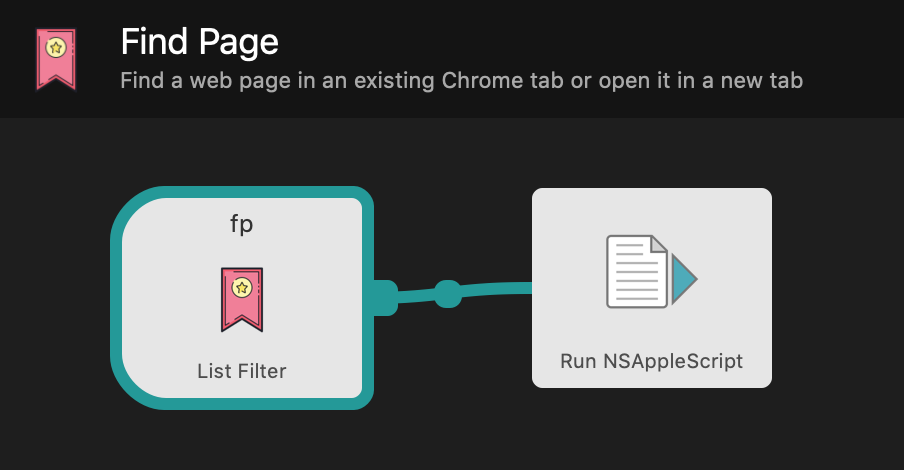
The Find Page workflow takes a URL from a predefined list, runs an AppleScript that finds and activates the associated page if it’s already open in Chrome, otherwise it opens it in a new tab.

Find Page Workflow definition
Find Page Workflow example

You can download the workflow and try it yourself.

Engineering Productivity

Camille Fournier:

So what are the management skills that are needed to achieve [Engineering productivity]? At the first level of management, they look like:

  1. Breaking down the scope of projects to help your team ship frequently. An eye for the MVP, for sequencing work and for predicting likely risks and bottlenecks for project completion are the skills here. This is why I think project management is such an important part of engineering leadership development, and why I hate to hand it off to professional project managers for work that doesn’t cross teams or organizations.

Bingo.

An Index of Ideas

Shawn Blanc:

Your own index is something you put in the back of the book (or the front if you prefer). It’s a list of the book’s themes and topics that most resonate with you, and the pages which have the best quotes and ideas around those topics.

I’ll use an index card to do this for the ebooks I read.

How to Write a Git Commit Message

Chris Beams:

A properly formed git commit subject line should always be able to complete the following sentence:

If applied, this commit will your subject line here

For example:

  • If applied, this commit will refactor subsystem X for readability
  • If applied, this commit will update getting started documentation
  • If applied, this commit will remove deprecated methods
  • If applied, this commit will release version 1.0.0
  • If applied, this commit will merge pull request #123 from user/branch

Making chruby and binstubs play nice

Like a gentleman I use chruby and Bundler to manage Ruby versions and gems in my projects.

Instead of typing bundle exec to run gem executables within a project, I prefer saving keystrokes and using an executable’s name on its own1. I also want to avoid installing another tool like Gem home.

So off to binstubs land I go. Bundler generates them for you and these days Rails even ships with a few as standard. These stub files live in your project and ensure the right set of gems for your project are loaded when they’re executed.

Security risks aside I could just prepend my path with ./bin: and walk away—except that chruby auto-switching spoils the party. When I enter a project directory with a .ruby-version file, chruby prepends the current Ruby version paths at the beginning of PATH thereby matching before my previously prepended ./bin:.

Chruby recommends using rubygems-bundler but I don’t want to install another gem to get this to work. So I tweaked my zsh setup to use preexec_functions like chruby to patch my PATH. I add my function to preexec_functions after chruby loads so that my code patches the PATH after chruby does its work.

As for security I use the same scheme as Tim Pope. Add a git alias for marking a git repository as trusted and then only add a project’s bin directory to PATH if it is marked as such.

Now I just mark a repo as trusted via git trust, and its local binstubs are automatically added to my path.

Changes in my .zshenv:

# Remove the need for bundle exec ... or ./bin/...
# by adding ./bin to path if the current project is trusted

function set_local_bin_path() {
  # Replace any existing local bin paths with our new one
  export PATH="${1:-""}`echo "$PATH"|sed -e 's,[^:]*\.git/[^:]*bin:,,g'`"
}

function add_trusted_local_bin_to_path() {
  if [[ -d "$PWD/.git/safe" ]]; then
    # We're in a trusted project directory so update our local bin path
    set_local_bin_path "$PWD/.git/safe/../../bin:"
  fi
}

# Make sure add_trusted_local_bin_to_path runs after chruby so we
# prepend the default chruby gem paths
if [[ -n "$ZSH_VERSION" ]]; then
  if [[ ! "$preexec_functions" == *add_trusted_local_bin_to_path* ]]; then
    preexec_functions+=("add_trusted_local_bin_to_path")
  fi
fi

The git trust alias from my .gitconfig:

[alias]
  # Mark a repo as trusted
  trust = "!mkdir -p .git/safe"

  1. Even though I’ve aliased bundle exec to be in my shell I still feel like an animal when I have to type it. ↩︎

A System for Success

James Clear:

In my opinion, this is the greatest success “hack” there is. If you live in an environment that nudges you toward the right decision and if you surround yourself with people who make your new behavior seem normal, then you’ll find success is almost an afterthought.

Systems are better than goals.

RSS feed for content about Productivity.