<?xml version="1.0" encoding="utf-8" standalone="yes"?>
<feed xmlns="http://www.w3.org/2005/Atom">
  <title>Software on Grizzlebit</title>
  <subtitle>Ray Grasso's Blog</subtitle>
  <updated>2026-08-13T08:22:37.718497+08:00</updated>
  <id>https://www.grizzlebit.com/tags/software/feed.xml</id>
  <link rel="alternate" type="text/html" href="https://www.grizzlebit.com/tags/software/"/>
  <link rel="self" type="application/atom+xml" href="https://www.grizzlebit.com/tags/software/feed.xml"/>
  <rights>Copyright © 2026, Ray Grasso</rights>
  <author>
    <name>Ray Grasso</name>
  </author>
  <icon>https://www.grizzlebit.com/images/icon.png</icon>
  <logo>https://www.grizzlebit.com/images/icon.png</logo>
  
  <entry>
    <id>https://www.grizzlebit.com/links/2026/07-26-last-fm-mcp-server/</id>
    <published>2026-07-26T13:16:59+08:00</published>
    <updated>2026-07-26T13:40:32+08:00</updated>
    <author><name>Ray Grasso</name></author>
    
    <title>Last.fm MCP Server ↬</title>
    <content type="html" xml:base="https://www.grizzlebit.com/links/" xml:lang="en"><![CDATA[<div>
  <p>Handy to connect your listening history to an LLM to generate some custom playlists.</p>

  <p>
    
    <a href="https://www.grizzlebit.com/links/2026/07-26-last-fm-mcp-server/">↬</a>
     ∙ Tagged in <a href="https://www.grizzlebit.com/tags/music/">Music</a>, <a href="https://www.grizzlebit.com/tags/software/">Software</a>.</p>
</div>
]]></content>
    <link rel="alternate" href="https://lastfm-mcp.com/"></link>
    <link rel="related" href="https://www.grizzlebit.com/links/2026/07-26-last-fm-mcp-server/"></link>
    
  </entry>
  
  <entry>
    <id>https://www.grizzlebit.com/links/2026/07-26-lolgato/</id>
    <published>2026-07-26T13:12:43+08:00</published>
    <updated>2026-07-26T13:40:32+08:00</updated>
    <author><name>Ray Grasso</name></author>
    
    <title>Lolgato ↬</title>
    <content type="html" xml:base="https://www.grizzlebit.com/links/" xml:lang="en"><![CDATA[<div>
  <p>A handy utility for controlling Elgato lights.</p>
<p>The feature to switch your lights on and off with your camera state is killer.</p>

  <p>
    
    <a href="https://www.grizzlebit.com/links/2026/07-26-lolgato/">↬</a>
     ∙ Tagged in <a href="https://www.grizzlebit.com/tags/software/">Software</a>.</p>
</div>
]]></content>
    <link rel="alternate" href="https://github.com/raine/lolgato"></link>
    <link rel="related" href="https://www.grizzlebit.com/links/2026/07-26-lolgato/"></link>
    
  </entry>
  
  <entry>
    <id>https://www.grizzlebit.com/links/2025/02-25-libation/</id>
    <published>2025-02-25T10:04:49+08:00</published>
    <updated>2025-02-25T10:08:01+08:00</updated>
    <author><name>Ray Grasso</name></author>
    
    <title>Libation ↬</title>
    <content type="html" xml:base="https://www.grizzlebit.com/links/" xml:lang="en"><![CDATA[<div>
  <p>Lots of talk of <a href="https://github.com/treetrum/amazon-kindle-bulk-downloader">backing up</a> and <a href="https://github.com/noDRM/DeDRM_tools">stripping DRM</a> from Kindle books lately.</p>
<p>In my associated adventures I found this app for doing similar with your Audible library.</p>

  <p>
    
    <a href="https://www.grizzlebit.com/links/2025/02-25-libation/">↬</a>
     ∙ Tagged in <a href="https://www.grizzlebit.com/tags/books/">Books</a>, <a href="https://www.grizzlebit.com/tags/software/">Software</a>.</p>
</div>
]]></content>
    <link rel="alternate" href="https://github.com/rmcrackan/Libation"></link>
    <link rel="related" href="https://www.grizzlebit.com/links/2025/02-25-libation/"></link>
    
  </entry>
  
  <entry>
    <id>https://www.grizzlebit.com/posts/2024/12-21-photomator/</id>
    <published>2024-12-21T11:49:12+10:00</published>
    <updated>2024-12-21T12:01:08+10:00</updated>
    <author><name>Ray Grasso</name></author>
    
    <title>Photomator</title>
    <content type="html" xml:base="https://www.grizzlebit.com/posts/" xml:lang="en"><![CDATA[<div>
  <p>I&rsquo;ve been giving <a href="https://www.pixelmator.com/photomator/">Photomator</a> a try for photo post-processing and it&rsquo;s great.</p>
<p>I enjoy having the masking, healing, and rich editing features of Lightroom<sup id="fnref:1"><a href="#fn:1" class="footnote-ref" role="doc-noteref">1</a></sup> in software that works natively with my Apple Photos library<sup id="fnref:2"><a href="#fn:2" class="footnote-ref" role="doc-noteref">2</a></sup>.</p>
<p>In effect, it replaces <a href="https://darkroom.co/">Darkroom</a> and <a href="https://apps.apple.com/us/app/touchretouch/id373311252">TouchRetouch</a> for editing my native iPhone photos. If things get a bit tough to sort with my thumbs I can switch over the mac version of the software and everything is synced up.</p>
<p>Hopefully Apple keep the core experience the same now that they&rsquo;ve acquired it.</p>
<div class="footnotes" role="doc-endnotes">
<hr>
<ol>
<li id="fn:1">
<p>I still use Lightroom for post-processing my non-iPhone photo.&#160;<a href="#fnref:1" class="footnote-backref" role="doc-backlink">&#x21a9;&#xfe0e;</a></p>
</li>
<li id="fn:2">
<p>I don&rsquo;t like having to export photos to Lightroom and then import what are effectively duplicates back into my Apple Photo library after editing.&#160;<a href="#fnref:2" class="footnote-backref" role="doc-backlink">&#x21a9;&#xfe0e;</a></p>
</li>
</ol>
</div>

  <p>
    
    <a href="https://www.grizzlebit.com/posts/2024/12-21-photomator/">🔗</a>
     ∙ Tagged in <a href="https://www.grizzlebit.com/tags/photography/">Photography</a>, <a href="https://www.grizzlebit.com/tags/software/">Software</a>.</p>
</div>
]]></content>
    <link rel="alternate" href="https://www.grizzlebit.com/posts/2024/12-21-photomator/"></link>
    <link rel="related" href="https://www.grizzlebit.com/posts/2024/12-21-photomator/"></link>
    
  </entry>
  
  <entry>
    <id>https://www.grizzlebit.com/posts/2024/11-07-digging-through-my-apple-music-library/</id>
    <published>2024-11-07T11:52:01+10:00</published>
    <updated>2024-11-07T11:57:49+10:00</updated>
    <author><name>Ray Grasso</name></author>
    
    <title>Digging Through My Apple Music Library</title>
    <content type="html" xml:base="https://www.grizzlebit.com/posts/" xml:lang="en"><![CDATA[<div>
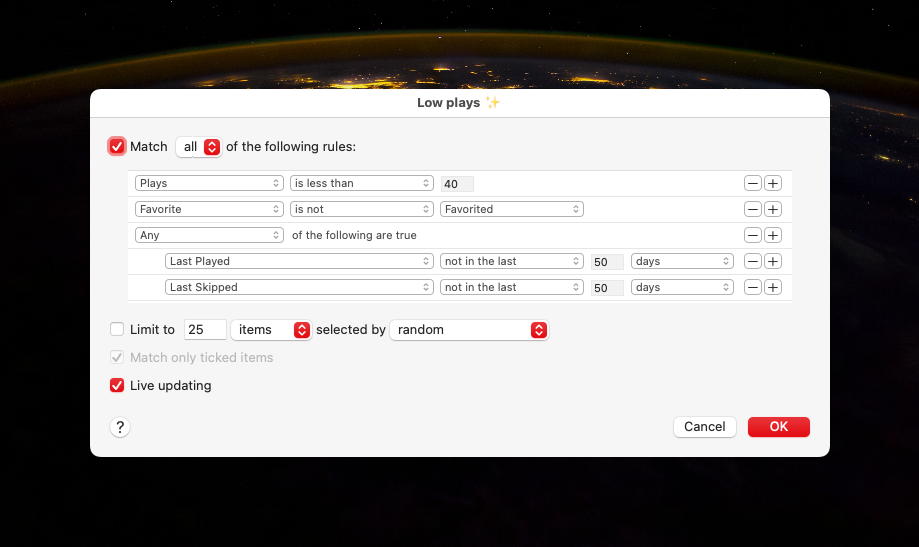
  <p>One feature Apple Music has that Spotify doesn&rsquo;t is Smart Playlists. They are handy for honing in on favourite tracks for specific artists or genres.</p>
<p>I knocked up this smart playlist that I shuffle to unearth underappreciated tracks in my library.</p>
<figure><img src="/images/low-plays-smart-playlist.png"
			alt="My Low plays smart playlist in Apple Music">
</figure>

<p>It&rsquo;s been throwing up some good gear.</p>

  <p>
    
    <a href="https://www.grizzlebit.com/posts/2024/11-07-digging-through-my-apple-music-library/">🔗</a>
     ∙ Tagged in <a href="https://www.grizzlebit.com/tags/music/">Music</a>, <a href="https://www.grizzlebit.com/tags/software/">Software</a>.</p>
</div>
]]></content>
    <link rel="alternate" href="https://www.grizzlebit.com/posts/2024/11-07-digging-through-my-apple-music-library/"></link>
    <link rel="related" href="https://www.grizzlebit.com/posts/2024/11-07-digging-through-my-apple-music-library/"></link>
    
  </entry>
  
  <entry>
    <id>https://www.grizzlebit.com/posts/2024/10-19-macos-apps-i-use/</id>
    <published>2024-10-19T09:40:44+10:00</published>
    <updated>2024-11-30T14:41:13+10:00</updated>
    <author><name>Ray Grasso</name></author>
    
    <title>macOS Apps I Use</title>
    <content type="html" xml:base="https://www.grizzlebit.com/posts/" xml:lang="en"><![CDATA[<div>
  <p>Time for another rundown post. Here are a bunch of macOS apps I use. You&rsquo;ll see some entries from my previous <a href="/posts/2024/10-12-iphone-apps-i-use/">iOS apps post</a> mentioned.</p>
<h2 id="productivity">Productivity</h2>
<p><a href="https://apps.apple.com/au/app/day-one/id1055511498">DayOne</a> - Where I journal.</p>
<p><a href="https://apps.apple.com/au/app/noteplan-to-do-list-notes/id1505432629">NotePlan</a> - My knowledge base for work. It uses plain Markdown files and has calendar-based notes which suit my workflow. I&rsquo;ve used it for task management too, but don&rsquo;t anymore. It&rsquo;s just a searchable knowledge base of work notes and references for me.</p>
<p><a href="https://www.alfredapp.com">Alfred</a> - My quick launcher for apps and custom workflows I&rsquo;ve collected and written. My workflow collection warrants a separate post.</p>
<p><a href="https://apps.apple.com/au/app/things-3/id904280696">Things</a> - Where I track everything I want to do at work and at home. Syncs to my phone which is essential.</p>
<p><a href="https://apps.apple.com/au/app/bear-markdown-notes/id1091189122">Bear</a> - My note taking and personal knowledge base. I keep work specific notes in NotePlan rather than here.</p>
<p><a href="https://apps.apple.com/au/app/mindnode-mind-map-outline/id1289197285">MindNode</a> - A clean mind mapping tool. Sometimes I find the spacial nature of mindmapping helps me structure my thoughts.</p>
<p><a href="https://flexibits.com/fantastical">Fantastical</a> - A calendar that shows my iCloud and Google calendars together. It&rsquo;s getting a bit pricey for what I use it for so it may not make it past its next subscription cycle renewal.</p>
<p><a href="https://mimestream.com">MimeStream</a> - A native GMail client. Goes good.</p>
<p><a href="https://www.hogbaysoftware.com/bike/">Bike</a> - I swear the only reason I use this outliner is because of its delightful animations. I wish this UI was embedded in NotePlan.</p>
<p><a href="https://apps.apple.com/au/app/ulysses-writing-app/id1225570693">Ulysses</a> - Good for long form writing. I do less and less of this so am struggling to justify the subscription cost.</p>
<p><a href="https://monodraw.helftone.com">Monodraw</a> - I love ASCII art.</p>
<h2 id="web-browsing-and-plug-ins">Web browsing and plug-ins</h2>
<p><a href="https://www.apple.com/au/safari/">Safari</a> and <a href="https://www.google.com/chrome/">Chrome</a> - I use Chrome for work as it enables a bunch of features in the Google Suite. I to keep my personal browsing separate so I use use Safari for that. I use <a href="https://choosy.app">Choosy</a> on my work machine to route common sites accordingly. I don&rsquo;t use Chrome at all on my personal laptop. I gave <a href="https://arc.net">Arc</a> a crack for a while instead of Safari, it was kinda cool but ultimately not worth the battery drain.</p>
<p><a href="https://apps.apple.com/au/app/1blocker-ad-blocker/id1365531024">1Blocker</a> - Ad blocker for Safari.</p>
<p><a href="https://apps.apple.com/au/app/stopthemadness/id1376402589">StopTheMadness</a> - Deal with a bunch of annoying stuff on the web.</p>
<p><a href="https://apps.apple.com/au/app/kagi-for-safari/id1622835804">Kagi Search</a> - Supporting the little guy.</p>
<p><a href="https://apps.apple.com/au/app/supercopy-for-safari/id6477720316">Supercopy</a> - Provides a hot key to copy links (I loved this on Arc).</p>
<p><a href="https://apps.apple.com/au/app/instapaper/id288545208">Instapaper</a> - My read later service of choice.</p>
<h2 id="music-and-video">Music and video</h2>
<p><a href="https://www.spotify.com">Spotify</a> - This cops a hiding.</p>
<p><a href="https://music.apple.com/">Apple Music</a> - I still have a bunch of my music in Apple Music (via iTunes Match) so I sometimes play music here. I use <a href="https://apps.apple.com/au/app/neptunes-for-itunes-spotify/id1006739057">NepTunes</a> to scrobble from Apple Music to <a href="https://www.last.fm/user/raygrasso">Last.fm</a>.</p>
<p><a href="https://apps.apple.com/au/app/musicbox-save-music-for-later/id1614730313">MusicBox</a> - I save albums in here to listen to later.</p>
<p><a href="https://www.videolan.org/vlc/">VLC</a> - O.G. video player.</p>
<p><a href="https://apps.apple.com/au/app/play-save-videos-watch-later/id1596506190">Play</a> - I save online videos in here to watch later. The Apple TV and iPad companion apps are killer.</p>
<p><a href="https://apps.apple.com/au/app/dark-noise-ambient-sounds/id1465439395">DarkNoise</a> - A white noise app. Goes great with over ear headphones.</p>
<h2 id="other-internet-reading">Other internet reading</h2>
<p><a href="https://apps.apple.com/au/app/unread-an-rss-reader/id1363637349">Unread</a> - Viva la RSS.</p>
<p><a href="https://apps.apple.com/au/app/ivory-for-mastodon-by-tapbots/id6444602274">Ivory</a> - For trawling <a href="https://aus.social/@grassdog">Mastodon</a>.</p>
<h2 id="coding">Coding</h2>
<p><a href="https://iterm2.com">iTerm</a> - Still a solid terminal, though <a href="https://www.warp.dev">Warp</a> looks like a fresh approach.</p>
<p><a href="https://code.visualstudio.com">VSCode</a> - I didn&rsquo;t see a Chromium tool winning but here we are. I like the vibes of <a href="https://zed.dev">Zed</a> but <a href="https://code.visualstudio.com/docs/devcontainers/create-dev-container">dev containers</a> keep me on VSCode.</p>
<p><a href="https://neovim.io">NeoVim</a> - This old Vim guy still throws up some motions in a terminal from time to time.</p>
<p><a href="https://orbstack.dev">OrbStack</a> - A nice way to run Docker containers.</p>
<p><a href="https://eggerapps.at/postico2/">Postico</a> - A solid Postgres client.</p>
<p><a href="https://git-fork.com">Fork</a> - I mostly use this Git client to stage partial lines and, increasingly, to rebase commits.</p>
<h2 id="photography">Photography</h2>
<p><a href="https://www.adobe.com/au/products/photoshop-lightroom-classic.html">Lightroom Classic</a> - This is where I manage and process the majority of my photos.</p>
<p><a href="https://www.adobe.com/au/products/photoshop.html">Photoshop</a> - For those times you need finer grained processing.</p>
<p><a href="https://www.topazlabs.com/topaz-photo-ai">Topaz Photo AI</a> - Mostly used for upscaling old photos and noise reduction. With that said, the noise reduction that&rsquo;s been added to Lightroom is pretty good so I might retire this sucker.</p>
<h2 id="utilities">Utilities</h2>
<p><a href="https://1password.com">1Password</a> - My password and secrets manager.</p>
<p><a href="https://manytricks.com/moom/">Moom</a> - Adds a bit of window management for when I&rsquo;m using an external monitor.</p>
<p><a href="https://karabiner-elements.pqrs.org">Karabiner Elements</a> - Lets me <a href="/posts/2020/06-10-hyper-keys-and-mouse-buttons-with-karabiner">customise my keyboard and mouse</a>.</p>
<p>Apple Shortcuts - Handy for automation and gluing things together. Pairs well with Alfred.</p>
<p><a href="https://www.expressvpn.com">ExpressVPN</a> - 🕵️‍♂️</p>
<p><a href="https://soulver.app">Soulver</a> - Notes and calculations in one spot.</p>
<p><a href="https://cleanshot.com">CleanShot X</a> - Slick screenshots.</p>

  <p>
    
    <a href="https://www.grizzlebit.com/posts/2024/10-19-macos-apps-i-use/">🔗</a>
     ∙ Tagged in <a href="https://www.grizzlebit.com/tags/recommendations/">Recommendations</a>, <a href="https://www.grizzlebit.com/tags/software/">Software</a>, <a href="https://www.grizzlebit.com/tags/tools/">Tools</a>.</p>
</div>
]]></content>
    <link rel="alternate" href="https://www.grizzlebit.com/posts/2024/10-19-macos-apps-i-use/"></link>
    <link rel="related" href="https://www.grizzlebit.com/posts/2024/10-19-macos-apps-i-use/"></link>
    
  </entry>
  
  <entry>
    <id>https://www.grizzlebit.com/posts/2024/10-12-iphone-apps-i-use/</id>
    <published>2024-10-12T16:16:36+10:00</published>
    <updated>2024-11-04T09:50:52+10:00</updated>
    <author><name>Ray Grasso</name></author>
    
    <title>iPhone Apps I Use</title>
    <content type="html" xml:base="https://www.grizzlebit.com/posts/" xml:lang="en"><![CDATA[<div>
  <p>I love finding out about what apps other folks use so I thought I&rsquo;d give a rundown on what&rsquo;s on my iPhone.</p>
<h2 id="health-and-fitness">Health and fitness</h2>
<p><a href="https://apps.apple.com/au/app/meditation-timer-zenitizer/id6444767911">Zenitizer</a> - A meditation timer that can play some white noise and throw up chimes on a custom interval. Most of the other meditation apps are junky or have a bunch of courses in them and cost a bunch more.</p>
<p><a href="https://apps.apple.com/au/app/macrofactor-macro-tracker/id1553503471">MacroFactor</a> - A calorie tracker app that has a nicer UX than <a href="https://www.myfitnesspal.com">MyFitnessPal</a>. Remember kids, you can&rsquo;t outrun your mouth.</p>
<p><a href="https://apps.apple.com/au/app/hevy-workout-tracker-gym-log/id1458862350">Hevy</a> - Fairly simple way to track strength workouts. The Apple Watch companion app is solid.</p>
<p><a href="https://apps.apple.com/au/app/fitbod-workout-gym-planner/id1041517543">Fitbod</a> - I&rsquo;m not using it at the moment, but if you want an app to suggest workouts based upon equipment you have to hand that has good Apple Watch integration, this is great.</p>
<h2 id="photography">Photography</h2>
<p><a href="https://apps.apple.com/au/app/darkroom-photo-video-editor/id953286746">Darkroom</a> - I like how this edits photos in place non-destructively. There&rsquo;s decent variety in its preset community. <a href="https://apps.apple.com/au/app/lightroom-photo-video-editor/id878783582">Lightroom</a> has better masking and noise reduction options which is sometimes helpful.</p>
<p><a href="https://apps.apple.com/au/app/touchretouch/id373311252">Retouch</a> - When I want to spot remove blemishes, this app does a bang up job.</p>
<p><a href="https://apps.apple.com/au/app/halide-mark-ii-pro-camera/id885697368">Halide</a> - Manual shooting controls, and now with <a href="https://www.lux.camera/process-zero-manual/">Process Zero</a>, less processed raw images.</p>
<p><a href="https://apps.apple.com/au/app/google-photos/id962194608">Google Photos</a> - I use this mostly as a second photo library backup (after Apple Photos). The search is better than Apple photos (duh) and the geographic heatmap view is fun.</p>
<p><a href="https://apps.apple.com/au/app/leica-fotos/id1356061526">Leica</a> and <a href="https://apps.apple.com/au/app/fujifilm-xapp/id1586089681">Fuji</a> apps - Mostly used for pairing with my cameras so I can tag GPS coordinates as I shoot.</p>
<p><a href="https://apps.apple.com/au/app/lumy/id908905093">Lumy</a> - A nice, sanely priced, golden hour tracker.</p>
<p><a href="https://apps.apple.com/au/app/kino-pro-video-camera/id6472380172">Kino</a> - Doofus-proof colour grading and anti shake are baked into this video camera.</p>
<h2 id="reading">Reading</h2>
<p><a href="https://apps.apple.com/au/app/instapaper/id288545208">Instapaper</a> - The O.G. read-it-later app for me. It&rsquo;s still where I read and highlight the most.</p>
<p><a href="https://apps.apple.com/au/app/unread-an-rss-reader/id1363637349">Unread</a> - My RSS feed reader. I use <a href="https://feedbin.com">Feedbin</a> as a backend. I use Unread to scan through my RSS feeds and triage articles I want to read. The ones I like, I send to Instapaper.</p>
<p><a href="https://apps.apple.com/au/app/kindle/id302584613">Kindle</a> and <a href="https://apps.apple.com/au/app/audible-audiobooks-podcasts/id379693831">Audible</a> - I read or listen to most of my books here. Though, now that Spotify premium offers 15 hours a month of audiobook listening, I&rsquo;m using that more. With that said, the Audible interface is way better.</p>
<p><a href="https://apps.apple.com/au/app/oreilly/id881697395">O&rsquo;Reilly</a> - I have an O&rsquo;Reilly subscription through work so I read some technical work on here.</p>
<p><a href="https://apps.apple.com/au/app/readwise/id1476885528">Readwise</a> - I&rsquo;m on a grandfathered plan from the beta. I pump my Kindle and Instapaper highlights into this. The daily review feature in this app is like having flashcards for them.</p>
<p><a href="https://apps.apple.com/au/app/the-economist-news-podcasts/id1239397626">The Economist</a> - I read the &ldquo;World in brief&rdquo; most days to catch up on what&rsquo;s happening around the traps.</p>
<p><a href="https://apps.apple.com/au/app/storygraph-reading-tracker/id1570489264">StoryGraph</a> - I&rsquo;m trying this to track the books I want to read. It&rsquo;s a bit clunky but does the job.</p>
<h2 id="music-and-podcasts">Music and Podcasts</h2>
<p><a href="https://apps.apple.com/au/app/spotify-get-music-podcasts/id324684580">Spotify</a> - My music subscription service of choice. I kick off most work weeks with my &ldquo;Discover Weekly&rdquo; playlist. Spotify&rsquo;s recommendations continue to throw up things I haven&rsquo;t heard before that I like.</p>
<p><a href="https://apps.apple.com/au/app/marvis-pro/id1447768809">Marvis</a> - I still have a bunch of music uploaded to Apple Music via iTunes Match. Marvis is a nice player for my Apple Music library. It includes <a href="https://www.last.fm/user/raygrasso">Last.fm scrobbling</a> and lyrics viewing which is handy.</p>
<p><a href="https://apps.apple.com/au/app/overcast/id888422857">Overcast</a> - My podcasting app of choice for years now. The Smart Speed feature is still killer.</p>
<p><a href="https://apps.apple.com/au/app/musicbox-save-music-for-later/id1614730313">MusicBox</a> - I track albums I want to listen to in here.</p>
<p><a href="https://apps.apple.com/au/app/dark-noise-ambient-sounds/id1465439395">Dark Noise</a> - A white noise app for those times I need to lock into some work. Headphones on and fire up one of the mixes I&rsquo;ve made.</p>
<h2 id="productivity-and-miscellaneous">Productivity and Miscellaneous</h2>
<p><a href="https://apps.apple.com/au/app/things-3/id904237743">Things</a> - Where I track everything I want to do at work and at home. Syncs to my Mac and iPad which is essential.</p>
<p><a href="https://apps.apple.com/au/app/bear-markdown-notes/id1016366447">Bear</a> - My note taking and personal knowledge base. The UI is slick and the search and tagging works.</p>
<p><a href="https://apps.apple.com/au/app/gmail-email-by-google/id422689480">Gmail</a> - I use Gmail for work and personal email so the standard app from Google makes sense.</p>
<p><a href="https://apps.apple.com/au/app/google-calendar-get-organised/id909319292">Google Calendar</a> - Somehow this is the best calendar app I&rsquo;ve found. It handles iCloud calendars and Google calendars (for work) in one place well.</p>
<p><a href="https://apps.apple.com/au/app/day-one-journal-private-diary/id1044867788">Day One</a> - I&rsquo;ve been journaling in this for something like 13 years. I love it. The &ldquo;On this day&rdquo; view surfaces up something interesting most days.</p>
<p><a href="https://apps.apple.com/au/app/mela-recipe-manager/id1548466041">Mela</a> - A nicely designed app for saving recipes.</p>
<p><a href="https://apps.apple.com/au/app/1password-password-manager/id1511601750">1Password</a> - I still use this for passwords and secrets for work and the family.</p>
<p><a href="https://apps.apple.com/au/app/swiftscan-ai-document-scanner/id834854351">SwiftScan</a> - It&rsquo;s getting a bit pushy with upgrading but this base version still works a treat when it comes to scanning receipts or documents.</p>
<p><a href="https://apps.apple.com/au/app/soulver-3/id1508732804">Soulver</a> - In the venn diagram between a calculator and a spreadsheet.</p>
<h2 id="stock-apple-apps">Stock Apple apps</h2>
<p>Apple Photos - I export at least a JPG of all my photos here. The photo widget and Apple TV screensaver reliably bring me joy with the photos they surface.</p>
<p>Camera - This is the camera I use the most.</p>
<p>Apple Maps - The maps have gotten good and I prefer its turn-by-turn guidance over Google Maps.</p>
<p>Fitness and Health - I track all my workouts, activity, and sleep in here. Absolutes can be off but the trends are good to pay attention to.</p>
<p>Shortcuts - This hits me in the soft futzing centres of my soul. I enjoy gluing stuff together and making accessing apps easier.</p>

  <p>
    
    <a href="https://www.grizzlebit.com/posts/2024/10-12-iphone-apps-i-use/">🔗</a>
     ∙ Tagged in <a href="https://www.grizzlebit.com/tags/recommendations/">Recommendations</a>, <a href="https://www.grizzlebit.com/tags/software/">Software</a>, <a href="https://www.grizzlebit.com/tags/tools/">Tools</a>.</p>
</div>
]]></content>
    <link rel="alternate" href="https://www.grizzlebit.com/posts/2024/10-12-iphone-apps-i-use/"></link>
    <link rel="related" href="https://www.grizzlebit.com/posts/2024/10-12-iphone-apps-i-use/"></link>
    
  </entry>
  
  <entry>
    <id>https://www.grizzlebit.com/links/2024/09-12-unread-4-2/</id>
    <published>2024-09-12T11:00:16-06:00</published>
    <updated>2026-07-24T14:27:45+08:00</updated>
    <author><name>Ray Grasso</name></author>
    
    <title>Unread 4.2 ↬</title>
    <content type="html" xml:base="https://www.grizzlebit.com/links/" xml:lang="en"><![CDATA[<div>
  <p>John Brayton:</p>
<blockquote>
<p>Similarly there is a new optional Next Article menu item for the swipe left menu of the article view on iPhone and iPad. To enable it, open the Settings screen, select Articles under Basic Options, and turn on Next Article under Basic Actions.</p>
</blockquote>
<p>I tend to do a continuous scroll through my unread article list each day on my phone and often want to skip over long articles I&rsquo;m not interested in.</p>
<p>This new action does the trick.</p>

  <p>
    
    <a href="https://www.grizzlebit.com/links/2024/09-12-unread-4-2/">↬</a>
     ∙ Tagged in <a href="https://www.grizzlebit.com/tags/reading/">Reading</a>, <a href="https://www.grizzlebit.com/tags/software/">Software</a>.</p>
</div>
]]></content>
    <link rel="alternate" href="https://www.goldenhillsoftware.com/2024/09/unread-42-adds-ios-18-features-and-more/"></link>
    <link rel="related" href="https://www.grizzlebit.com/links/2024/09-12-unread-4-2/"></link>
    
  </entry>
  
  <entry>
    <id>https://www.grizzlebit.com/links/2024/08-22-moom-4/</id>
    <published>2024-08-22T08:04:02+10:00</published>
    <updated>2024-08-22T08:05:18+10:00</updated>
    <author><name>Ray Grasso</name></author>
    
    <title>Moom 4 ↬</title>
    <content type="html" xml:base="https://www.grizzlebit.com/links/" xml:lang="en"><![CDATA[<div>
  <p>I use Moom for window management on macOS.</p>
<p>Version four has loads of new features I&rsquo;m keen to try.</p>

  <p>
    
    <a href="https://www.grizzlebit.com/links/2024/08-22-moom-4/">↬</a>
     ∙ Tagged in <a href="https://www.grizzlebit.com/tags/software/">Software</a>.</p>
</div>
]]></content>
    <link rel="alternate" href="https://manytricks.com/blog/?p=6385"></link>
    <link rel="related" href="https://www.grizzlebit.com/links/2024/08-22-moom-4/"></link>
    
  </entry>
  
  <entry>
    <id>https://www.grizzlebit.com/posts/2024/01-28-listen-and-watch-later/</id>
    <published>2024-01-28T09:18:17+10:00</published>
    <updated>2024-11-04T09:50:52+10:00</updated>
    <author><name>Ray Grasso</name></author>
    
    <title>Listen and Watch Later</title>
    <content type="html" xml:base="https://www.grizzlebit.com/posts/" xml:lang="en"><![CDATA[<div>
  <p>I&rsquo;m giving <a href="https://apps.apple.com/us/app/musicbox-save-music-for-later/id1614730313">MusicBox</a> and <a href="https://apps.apple.com/us/app/play-save-videos-watch-later/id1596506190">Play</a> a crack for keeping track of music I want to listen to and videos I want to watch<sup id="fnref:1"><a href="#fn:1" class="footnote-ref" role="doc-noteref">1</a></sup>.</p>
<p>I was previously managing my music to listen to via <a href="https://open.spotify.com/playlist/4EMsmXokYBjEC8lnM9t4ko">a specific playlist in Spotify</a> so I migrated that across.</p>
<p>For video, I migrated my YouTube Watch Later list, Instapaper videos folder, and AppleTV+ and Netflix watch later lists across.</p>
<p>I like how the apps sync across all my Apple devices and everything is in one spot.</p>
<p>I&rsquo;m especially keen to give the Play app on AppleTV a try.</p>
<p>Now I need something similar for all my podcasts and audiobooks.</p>
<div class="footnotes" role="doc-endnotes">
<hr>
<ol>
<li id="fn:1">
<p>I already use <a href="https://www.instapaper.com/">Instapaper</a> for articles I want to read later.&#160;<a href="#fnref:1" class="footnote-backref" role="doc-backlink">&#x21a9;&#xfe0e;</a></p>
</li>
</ol>
</div>

  <p>
    
    <a href="https://www.grizzlebit.com/posts/2024/01-28-listen-and-watch-later/">🔗</a>
     ∙ Tagged in <a href="https://www.grizzlebit.com/tags/media/">Media</a>, <a href="https://www.grizzlebit.com/tags/recommendations/">Recommendations</a>, <a href="https://www.grizzlebit.com/tags/software/">Software</a>.</p>
</div>
]]></content>
    <link rel="alternate" href="https://www.grizzlebit.com/posts/2024/01-28-listen-and-watch-later/"></link>
    <link rel="related" href="https://www.grizzlebit.com/posts/2024/01-28-listen-and-watch-later/"></link>
    
  </entry>
  
  <entry>
    <id>https://www.grizzlebit.com/links/2023/12-09-rewind-ai/</id>
    <published>2023-12-09T09:37:37+08:00</published>
    <updated>2026-07-24T14:27:45+08:00</updated>
    <author><name>Ray Grasso</name></author>
    
    <title>Rewind.ai ↬</title>
    <content type="html" xml:base="https://www.grizzlebit.com/links/" xml:lang="en"><![CDATA[<div>
  <p>Privacy concerns aside, this has me intrigued.</p>

  <p>
    
    <a href="https://www.grizzlebit.com/links/2023/12-09-rewind-ai/">↬</a>
     ∙ Tagged in <a href="https://www.grizzlebit.com/tags/knowledge-management/">Knowledge Management</a>, <a href="https://www.grizzlebit.com/tags/software/">Software</a>, <a href="https://www.grizzlebit.com/tags/tools/">Tools</a>.</p>
</div>
]]></content>
    <link rel="alternate" href="https://www.rewind.ai/"></link>
    <link rel="related" href="https://www.grizzlebit.com/links/2023/12-09-rewind-ai/"></link>
    
  </entry>
  
  <entry>
    <id>https://www.grizzlebit.com/links/2023/12-01-ia-writer-7/</id>
    <published>2023-12-01T07:24:19+08:00</published>
    <updated>2024-11-04T09:50:52+10:00</updated>
    <author><name>Ray Grasso</name></author>
    
    <title>iA Writer 7 ↬</title>
    <content type="html" xml:base="https://www.grizzlebit.com/links/" xml:lang="en"><![CDATA[<div>
  <blockquote>
<p>iA Writer dims the text you paste from AI tools. As you edit ChatGPT’s input and make it your own, iA Writer keeps track of what is yours and what isn’t.</p>
</blockquote>
<p>An interesting feature. They have <a href="https://github.com/iainc/Markdown-Annotations">a spec for the Markdown annotations</a> that underpin it.</p>

  <p>
    
    <a href="https://www.grizzlebit.com/links/2023/12-01-ia-writer-7/">↬</a>
     ∙ Tagged in <a href="https://www.grizzlebit.com/tags/ai/">AI</a>, <a href="https://www.grizzlebit.com/tags/software/">Software</a>.</p>
</div>
]]></content>
    <link rel="alternate" href="https://ia.net/topics/ia-writer-7"></link>
    <link rel="related" href="https://www.grizzlebit.com/links/2023/12-01-ia-writer-7/"></link>
    
  </entry>
  
  <entry>
    <id>https://www.grizzlebit.com/links/2023/07-08-how-ryan-singer-uses-omnigraffle/</id>
    <published>2023-07-08T20:14:17+08:00</published>
    <updated>2024-11-04T09:50:52+10:00</updated>
    <author><name>Ray Grasso</name></author>
    
    <title>How Ryan Singer Uses OmniGraffle ↬</title>
    <content type="html" xml:base="https://www.grizzlebit.com/links/" xml:lang="en"><![CDATA[<div>
  <p>Ryan emphasizes the effectiveness of the copy-paste method in rapidly exploring alternate options.</p>
<p>He also mentions some shaping and analysis tools including <a href="https://www.mindtools.com/aoxpu31/interrelationship-diagrams">Interrelationship diagrams</a> and <a href="https://jtbd.info/may-the-forces-diagram-be-with-you-always-applying-jtbd-everywhere-b1b325b50df3">Jobs To Be Done (JTBD) Four Forces Diagrams</a>.</p>
<p>A key point that struck a chord with me was his perspective on multiplayer tools like Miro. These tools are primarily valuable during simultaneous brainstorming processes like retrospectives.</p>
<p>Actual shaping typically involves a collective thought process, with a single individual transcribing the outcomes. This concept holds true even when using traditional methods like a whiteboard.</p>

  <p>
    
    <a href="https://www.grizzlebit.com/links/2023/07-08-how-ryan-singer-uses-omnigraffle/">↬</a>
     ∙ Tagged in <a href="https://www.grizzlebit.com/tags/design/">Design</a>, <a href="https://www.grizzlebit.com/tags/software/">Software</a>, <a href="https://www.grizzlebit.com/tags/tools/">Tools</a>.</p>
</div>
]]></content>
    <link rel="alternate" href="https://theomnishow.omnigroup.com/episode/how-ryan-singer-uses-omnigraffle/"></link>
    <link rel="related" href="https://www.grizzlebit.com/links/2023/07-08-how-ryan-singer-uses-omnigraffle/"></link>
    
  </entry>
  
  <entry>
    <id>https://www.grizzlebit.com/posts/2023/05-28-internet-trawling/</id>
    <published>2023-05-28T11:17:39+08:00</published>
    <updated>2024-11-04T09:50:52+10:00</updated>
    <author><name>Ray Grasso</name></author>
    
    <title>Internet Trawling</title>
    <content type="html" xml:base="https://www.grizzlebit.com/posts/" xml:lang="en"><![CDATA[<div>
  <p>I spend too much time reading online.</p>
<p>I tend to trawl content from a variety of sources, save the shiny ones in <a href="https://instapaper.com">Instapaper</a>, and read them later.</p>
<p>The majority of the articles I read are sourced from <a href="https://feedbin.com/">RSS feeds in Feedbin</a>. I&rsquo;ve organized these feeds into three categories: &lsquo;full read&rsquo;, &lsquo;skimmable&rsquo;, and &lsquo;skippable&rsquo;. This system means that if I ever feel overwhelmed by the volume of content, I can quickly mark a large number of articles as read and move on with life.</p>
<p>I like to complement these feeds with articles from elsewhere. I used to route specific Twitter accounts into Feedbin for this but <a href="https://feedbin.com/blog/2023/03/30/twitter-access-revoked/">that option is gone since the Twitter API &lsquo;asplosion</a><sup id="fnref:1"><a href="#fn:1" class="footnote-ref" role="doc-noteref">1</a></sup>.</p>
<p>Around the same time as that feature disappeared I started using <a href="https://artifact.news/">Artifact</a>. It&rsquo;s from the founders of Instagram and the early development cycle has been impressive. At its core is a machine curated personalised news feed<sup id="fnref:2"><a href="#fn:2" class="footnote-ref" role="doc-noteref">2</a></sup>. The recommendation engine feels like it still has room for improvement, I&rsquo;d love to be presented with more &ldquo;surprising&rdquo; articles, but it still manages to throw the odd interesting articles into the mix. Using it feels like panning for gold.</p>
<div class="footnotes" role="doc-endnotes">
<hr>
<ol>
<li id="fn:1">
<p><a href="https://aus.social/@grassdog">Mastodon</a> has taken up the Twitter link mantle somewhat.&#160;<a href="#fnref:1" class="footnote-backref" role="doc-backlink">&#x21a9;&#xfe0e;</a></p>
</li>
<li id="fn:2">
<p>I don&rsquo;t use the social features though it&rsquo;s clear that&rsquo;s where its focus is heading.&#160;<a href="#fnref:2" class="footnote-backref" role="doc-backlink">&#x21a9;&#xfe0e;</a></p>
</li>
</ol>
</div>

  <p>
    
    <a href="https://www.grizzlebit.com/posts/2023/05-28-internet-trawling/">🔗</a>
     ∙ Tagged in <a href="https://www.grizzlebit.com/tags/reading/">Reading</a>, <a href="https://www.grizzlebit.com/tags/software/">Software</a>, <a href="https://www.grizzlebit.com/tags/tools/">Tools</a>.</p>
</div>
]]></content>
    <link rel="alternate" href="https://www.grizzlebit.com/posts/2023/05-28-internet-trawling/"></link>
    <link rel="related" href="https://www.grizzlebit.com/posts/2023/05-28-internet-trawling/"></link>
    
  </entry>
  
  <entry>
    <id>https://www.grizzlebit.com/posts/2023/05-28-photoshop-generative-fill/</id>
    <published>2023-05-28T09:41:21+08:00</published>
    <updated>2024-11-04T09:50:52+10:00</updated>
    <author><name>Ray Grasso</name></author>
    
    <title>Photoshop Generative Fill</title>
    <content type="html" xml:base="https://www.grizzlebit.com/posts/" xml:lang="en"><![CDATA[<div>
  <p>The latest version of <a href="https://blog.adobe.com/en/publish/2023/05/23/future-of-photoshop-powered-by-adobe-firefly">Photoshop Beta now includes a feature called generative fill</a>.</p>
<p>I can imagine it&rsquo;s easy to compromise the authenticity in your photography if you overuse these kinds of tools. With that said, and I know it&rsquo;s potentially a slippery slide, there are situations where they can be incredibly useful.</p>
<p>For instance, I sometimes want to adjust a crop and need to fill in some areas to maintain the balance of the composition, and my Photoshop pixel-surfing chops aren&rsquo;t up to the task.</p>
<p>I had a crack at using generative fill on a photo I recently took that I wished had more foreground.</p>
<figure class="solid-border"><img src="/images/street-photo-before.png"><figcaption>
			<h4>The photo as shot with the canvas expanded to make room for more foreground.</h4>
		</figcaption>
</figure>

<figure class="solid-border"><img src="/images/street-photo-after.png"><figcaption>
			<h4>The photo with extra foreground filled in by the default generative fill prompt.</h4>
		</figcaption>
</figure>

<p>The results look usable.</p>
<p>I also tried a prompt that removed the shadow on the left but the results of that were less natural.</p>
<p>Experimenting with various prompts and browsing their outcomes is far more enjoyable than swearing at the healing and clone brush tools 😂.</p>

  <p>
    
    <a href="https://www.grizzlebit.com/posts/2023/05-28-photoshop-generative-fill/">🔗</a>
     ∙ Tagged in <a href="https://www.grizzlebit.com/tags/ai/">AI</a>, <a href="https://www.grizzlebit.com/tags/photography/">Photography</a>, <a href="https://www.grizzlebit.com/tags/software/">Software</a>, <a href="https://www.grizzlebit.com/tags/tools/">Tools</a>.</p>
</div>
]]></content>
    <link rel="alternate" href="https://www.grizzlebit.com/posts/2023/05-28-photoshop-generative-fill/"></link>
    <link rel="related" href="https://www.grizzlebit.com/posts/2023/05-28-photoshop-generative-fill/"></link>
    
  </entry>
  
</feed>